In some offices, employees still spend time checking room availability before meetings and presentations start. A meeting room booking system makes this process easier by helping teams view schedules and reserve rooms from one place.
Managing meeting rooms via email or spreadsheet may not seem like a problem. In many offices, that system continues for quite some time.
The situation usually changes once several teams begin using the same conference rooms every day. Someone books a room but forgets to update the schedule. Another team assumes the room is still free. Meetings get delayed, and people start checking rooms manually before discussions begin.
This is one reason many workplaces move to a meeting room booking system. Instead of depending on repeated messages or internal follow-ups, employees can simply open the schedule and see which rooms are available.
MLAI Solution is designed for offices where meeting schedules keep changing during the day, and several teams share the same meeting spaces.
Most companies prefer booking software that fits into existing office routines instead of creating additional work.
Manual room booking often creates confusion once meetings increase across departments.
A common issue in many offices happens when room schedules are not updated properly after bookings. Another team may then try using the same meeting room at the same time.
In some offices, employees still spend time checking whether rooms are available before meetings start.
Businesses often deal with:
Different teams often follow different booking methods. After some time, room schedules become harder to track across the office.
A proper meeting room booking software keeps booking details organized in one place so employees can check schedules more easily.
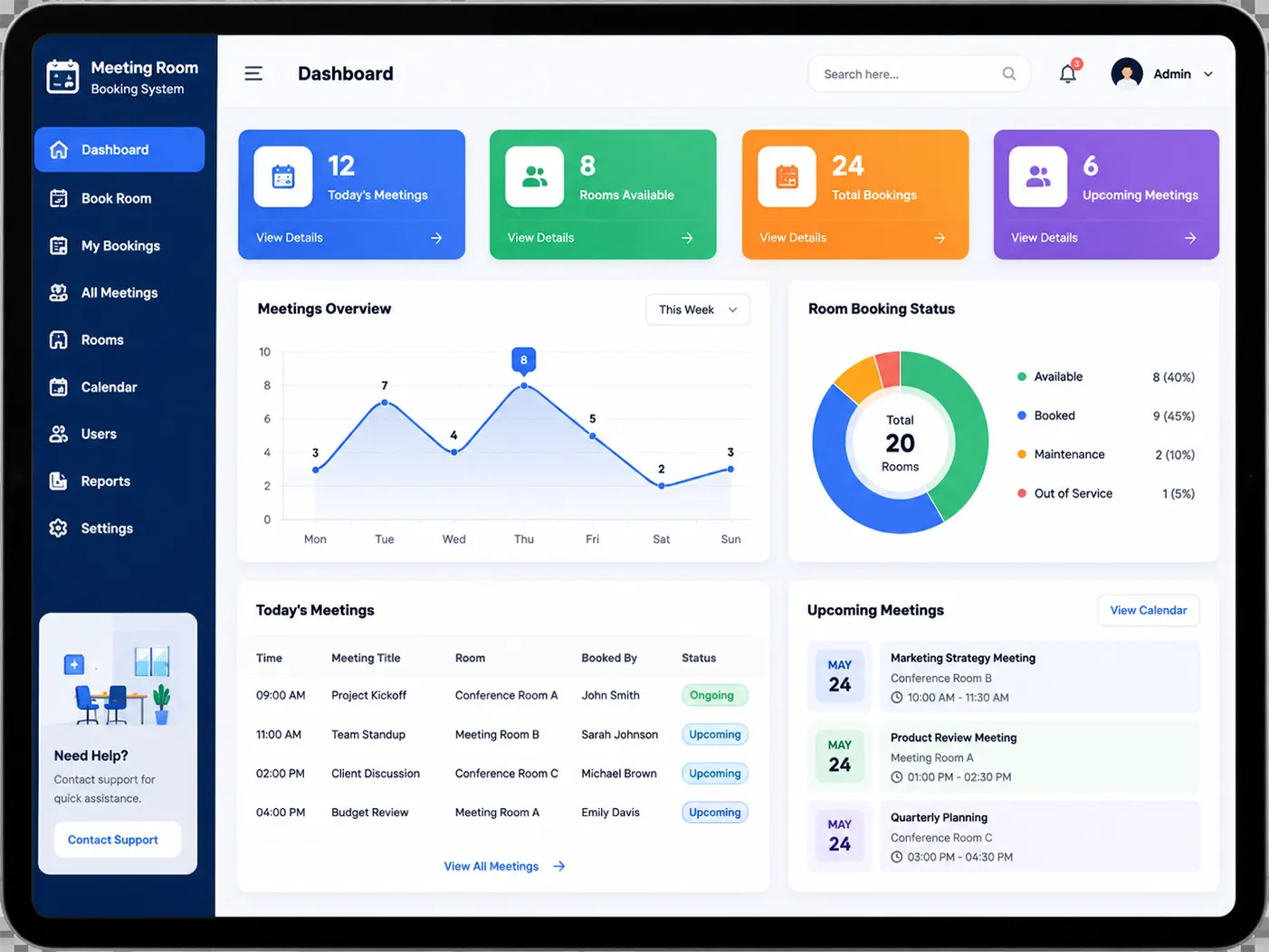
When booking information stays visible in one place, managing conference rooms becomes less confusing for teams. MLAI Solution gives offices one dashboard for room reservations, schedules, and meeting space management.
Managers still have visibility into room usage and schedule changes whenever needed.
Meeting room scheduling usually becomes difficult once office activity increases. A shared booking system makes it easier to see room availability without depending on manual coordination.
Teams can check which rooms are occupied before meetings begin. This helps reduce situations where two groups arrive for the same room.
Many offices already use Outlook or Google Calendar while planning meetings. Because of this, businesses usually prefer systems that work with existing schedules.
Outside conference rooms, employees can quickly check the meeting room booking display system before entering.
Room schedules can also be checked through mobile phones or tablets during office hours.
Booking reminders are shared before meetings so schedule changes are easier to notice.
In busy offices, keeping bookings in one place reduces the need for repeated follow-ups on room availability.
Meeting room coordination often becomes difficult in busy offices where several teams use the same conference rooms every day. Manual booking methods may work initially, but scheduling confusion usually increases as office activity grows.
Corporate businesses commonly use these systems for internal meetings, presentations, and client discussions. Co-working spaces also depend on them because different companies often share meeting spaces during the day.
Large organizations often struggle to coordinate room schedules when multiple departments share office space.
An office meeting room booking system helps teams track room availability and reserve meeting spaces more conveniently.
The platform also works as a meeting room reservation system for organizations managing shared office spaces and multiple teams.
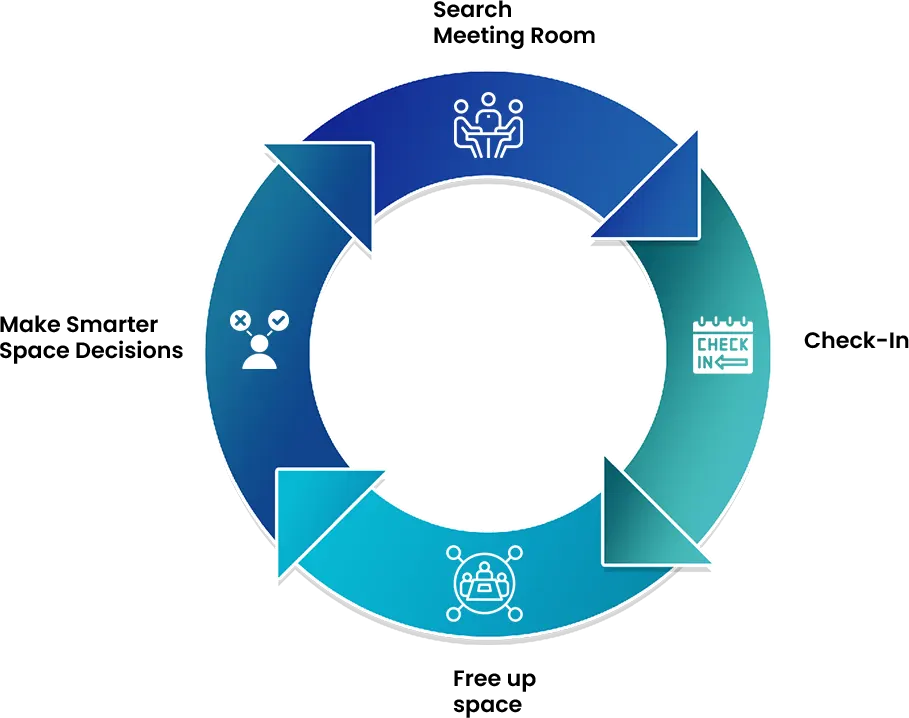
The meeting room scheduling software follows a simple booking process.
Many workplaces already depend on Outlook or Google Calendar while planning meetings. Because of this, offices usually prefer booking software that works with existing scheduling tools.
The platform also works with visitor management and office access systems used during the workday.
Many companies prefer systems that work with their current office setup rather than replacing everything.
Product Dashboard and Booking Interface
Teams can look at room availability and upcoming bookings throughout the day. In most cases, employees understand the platform fairly quickly.
Outside conference rooms, the meeting room booking display system shows current room status and booking details.
Businesses can also request a product demo to understand how the system works in actual office environments.
Many offices now prefer cloud-based meeting room booking systems for handling daily schedules.
A meeting room booking system is used for checking room schedules and managing meeting room reservations.
Users can open the schedule, select an available meeting room, and confirm the booking.
Yes, room schedules and bookings can also be checked from mobile phones or tablets.
Yes, meeting room scheduling software is used by many offices together with Outlook or Google Calendar while planning meetings.
Yes, small businesses also use meeting room booking systems when teams share conference rooms.
Yes, employees can check whether rooms are occupied before meetings begin.
Yes, updated schedules reduce overlapping room bookings.
Yes, many workplaces connect visitor management tools with meeting room booking systems.
Our meeting room booking systems work online and can be accessed from different devices.
A meeting room management system usually includes access controls and secure login settings to help businesses protect booking information and manage room schedules safely.
Room schedules become easier to manage once booking information stays available in one place. MLAI Solution provides a practical scheduling platform designed for everyday workplace needs.
Want to try Our Product Yourself before
Booking a
Demo with us?
SCAN
Quickly access the visitor registration form by scanning the code—no app download needed.
FILL
Enter your basic information in a user-friendly form designed for speed and simplicity.
GENERATE PASS
Once submitted, your digital pass is ready—secure, professional, and immediate!