MLAI Cafeteria management system / Canteen management system streamlines Cafeteria / Canteen operations in office buildings, colleges/universities, hospitals, multi-tenanted facilities and food courts, etc. With this software, you can automate the entire Cafeteria / Canteen operation, including meal order processing, billing, payment, food waste monitoring, inventory management, etc, smoothly and seamlessly. In Cafeteria management system / Canteen Management system, there are window-based or web-based management systems which store the information of an employee who is using the a Cafeteria / Canteen for breakfast, lunch or dinner. Employees can access their balance amount as well as their meal information using this software.
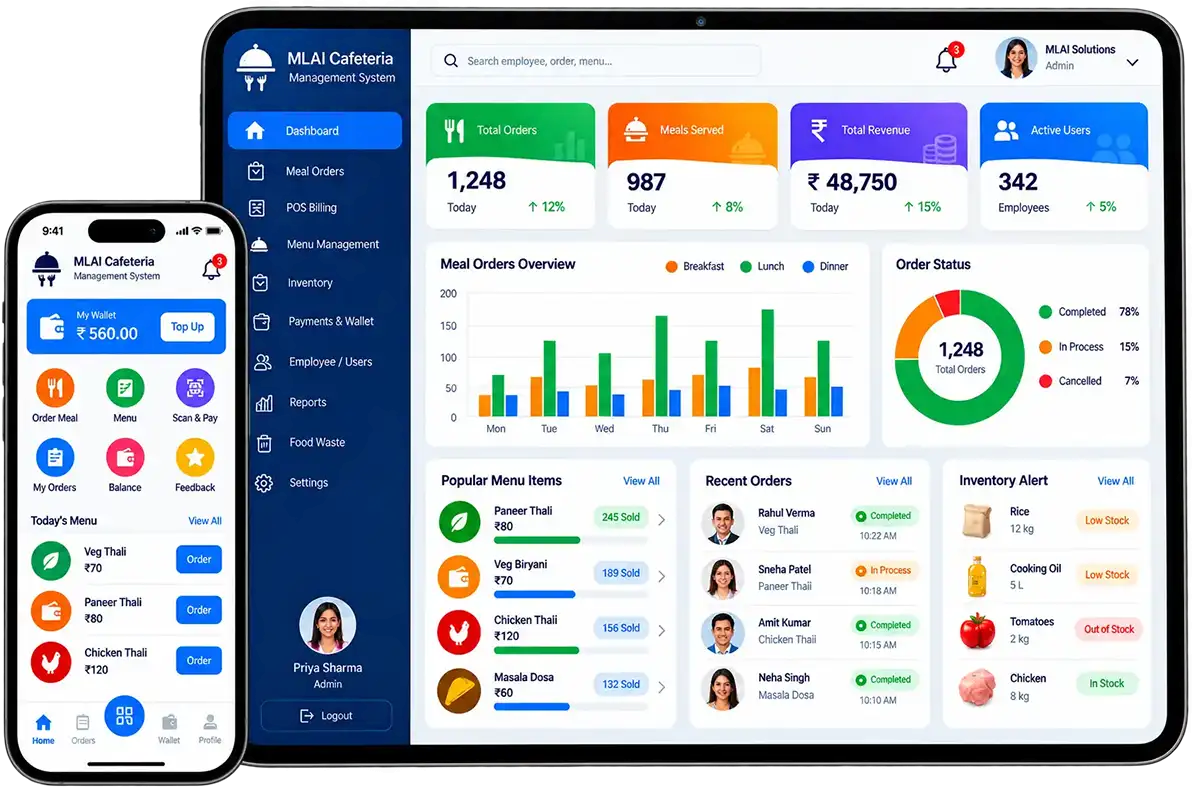
The system keeps a record of the items employees consume at mealtime, as well as the cost of each item and the total amount spent on the items.
It keeps a record of the employee's current balance.
Every transaction is recorded by the system.
Before any meals are issued to employees, the system checks the balance of the employee's meal card account. Depending on the balance, it allows the slip to be generated, otherwise, it rejects the request.
Vendors can design their menus, pricing, and billing structure. Administrators can design customized bills and receipts for customers and vendors.
With the help of a simple user-friendly interface, corporate houses can monitor & manage their food costs per employee.
Customers and employees can top up their food cards with cash or credit/debit cards. Through it, it is possible to set up centralized stations that facilitate easy refund procedures.
With a single click, users and managers can obtain detailed recharge and refund reports as well as report summaries.
With this feature, food vendors can enrol and delist with ease, which involves setting Cafeteria / Canteen policies and defining privileges. It also facilitates tracking vendor performance and delivering reports to management.
An organization's Cafeteria . Canteen records can be managed independently and accessed globally from multiple locations.
Email/SMS notification of meal requests, approvals, cancellations, and payments.
There is a facility for both prepaid and post-paid transactions.
Cards preloaded with a specific amount and validity period.
Cards preloaded with a specific amount and validity period.
Check and validate food transactions on a daily or monthly basis in real-time.
Prepaid balances and transaction-based deductions.
Time zone-based availability that is user-configurable.
Vendor-specific reports for the verification of payables.
The software supports multiple companies, multiple users, and multiple vendors.
Reports categorized by Employees, Departments, Vendors, and Items.
Access only to the items that are selected in the current time zone.
The Item Master allows you to create a new item, edit an existing item, or delete an existing item.
Through the Employee Master, you can create a new employee record, edit an existing employee record, and delete an existing employee record.
In this section, you will be able to create an entry for the newly purchased machine, as well as edit or delete the existing machine from the Canteen Management System.
By using this feature, you can add, modify, or delete any designation within your office. To find a specific entry, you may also search by Designation Code or Designation Name.
The Category Master feature allows the user to add different staff categories to the software. To find a particular entry, you may search by Category Code or Category Name.
The Department Master allows you to add a new department to your office. To locate a particular entry, you can also search by Department Code or Department Name.
In this, you can make the entry of cash deposit by the employee.
You can view the details of an employee's daily, weekly, or monthly meal transactions through this option on a daily, weekly, or monthly basis. The amount deducted will be reversed into the employee's meal account if any incorrect transactions have been made. Click on the delete button if any errors have been made.
In the following Item Master Information, you will be able to find out the information regarding all of the items in the canteen.
Here you will be able to find all the information related to all the machines in the canteen through this Machine Master Information page.
In this section of the Employee Master Information section, you will find all the information about the employees who use the canteen for their lunch and dinner.
Through the cash deposit information page, you will be able to see all the information about the employee who has deposited the cash.
This report provides information about all employees who used the canteen for lunch or dinner on the given day.
You will be able to view the information of all employees who have used the canteen for lunch or dinner during the specified period.
Detailed information is available regarding all employees who used the canteen for lunch or dinner on the given day.
You can access the information about all employees who used the canteen for lunch or dinner during the applicable period.
This report provides a listing of all items that were consumed in the canteen for lunch and dinner during the specified period.
The report contains information regarding the items consumed in the canteen for lunch and dinner during the specified period or month.
You can access information concerning each employee's current balance in the canteen.
This option displays a summary of all the deleted tokens for an employee. Several details can be seen such as Date, Employee Name, Time, Date, Token Number, Meal, Amount Deducted, and The Total Amount Left.
MLAI Cafeteria management system / Canteen Management system completes your stock-keeping real time basis.
It is possible to manage stock at your central hub with MLAI Cafeteria management system / Canteen Management system. The system enables you to make stock requests to your kitchen and to monitor the conversion of raw materials into semi-prepared items.
The system allows you to create purchase orders, enter inward stock receipts, manage stock transfers, and add wastage, providing you with a comprehensive overview of your entire supply chain.
By using the MLAI Cafeteria management system / Canteen Management system, you can configure recipes into the system, and it will automatically deduct the appropriate amount of raw materials when an item is billed. The system is flexible enough to accommodate multi-stage recipes, making it possible to manage even partially prepared items.
Obtain the live costs of any food items that you sell, based on the FIFO inventory model for raw materials that are consumed during production. You can now adjust your menu prices to account for any fluctuations in raw material prices.
To manage a sudden influx of orders, your store must maintain a minimum stock level at all times. You will never run out of key ingredients with configurable alerts that let you know when your stock is approaching a depletion point.
You can place purchase orders directly to suppliers and your central kitchen from the dashboard. Manage stock dispatch for a specific PO as well as populate frequently ordered items from suppliers.
Inventory takes up a lot of time at the end of the day. Stockists write it on paper, transfer it to Excel, and then upload it. Your daily stock is completed within minutes using MLAI Canteen Management System. All you have to do is select the item being weighed and enter the reading. Information is automatically transmitted to the MLAI cloud server.
Want to try Our Product Yourself before Booking a Demo with us?
SCAN
Point your phone at any MLAI QR code to get started. No app download, no login — just instant access to the product.
FILL DETAILS
Enter your basic information in a clean, straightforward form. Takes under a minute to complete.

GENERATE PASS
Your digital pass is generated instantly! verified, professional, and ready to use right away.